

total() correctly handles all metric types — including count_distinct and average — by re-running the metric’s native aggregation rather than naively summing grouped values.
Aggregate functions only accept metric field references — dimensions and other table calculations are not valid arguments. Passing a dimension (e.g.
total(${orders.customer_id})) returns the error “Tried to reference metric with unknown field id”.total
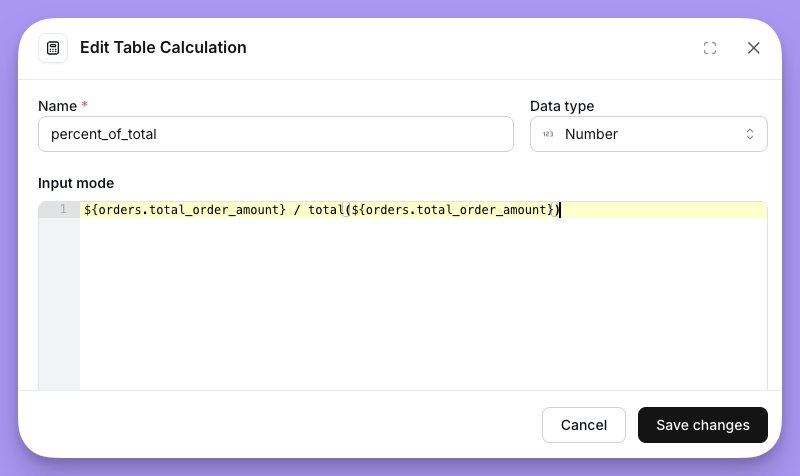
Returns the grand total of a metric across all rows, computed from the raw data using the metric’s native aggregation.
Example
Calculate each row’s share of total revenue:
How it works
How it works
Lightdash generates a
column_totals CTE that re-aggregates the metric from the raw data with no GROUP BY, producing a single grand-total value. This value is then cross-joined into the main query.For a sum metric, the CTE computes SUM(...). For count_distinct, it computes COUNT(DISTINCT ...). For average, it computes AVG(...). Each metric type uses its own native aggregation, so the total is always mathematically correct.row_total
Returns the sum of a metric’s values across all pivot columns for the current row.row_total is only available when your query includes a pivoted dimension. If no pivot is configured, row_total(${table.metric}) falls back to the metric’s value directly.How it works
How it works
Lightdash generates a
row_totals CTE that reads from the already-grouped results and computes SUM(metric) grouped by the non-pivot dimensions. This gives one total per row, which is then joined back into the main query.Unlike total(), row_total() always uses SUM regardless of the metric type, since it’s summing pre-aggregated values across the pivot columns within each row.